Install Let’s Encrypt Wildcard SSL Certificate With Nginx
abhishek-kumar
01 Jan 2019 11:38 AM
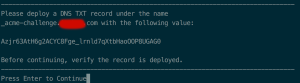 Once you get the DNS TXT as it can be seen below you have to login domain panel after that add this value and host name there.
 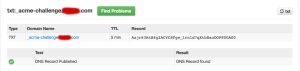 And then hit enter. After you add the said TXT record, confirm the DNS has updated before you hit enter. You can check if the DNS has been properly updated using dig $ dig _acme-challenge.pasls.com TXT # checking in local DNS server $ dig @8.8.8.8 _acme-challenge.pasls.com TXT # checking at Google DNS server Once you see the challenge text in the answer section, press Enter in the certbot terminal. Note:- Replace example.com with your domain name Deploy a DNS TXT record provided by Let’s Encrypt certbot after running the above command